Basic frames in fact don't have an underlying module, they are grouped under the Basic Frames pseudo module for the simplicity of Frame Type and Info screen (you use this screen to change a frame type from Rich Text any other). Please be aware of this technical difference not to get confused.
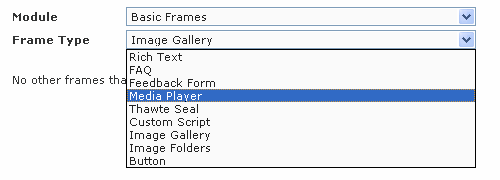
| • | Rich Text - Gives you a Rich Text Editor to type in formatted text and images. |
| • | FAQ - Gives you a convenient way to create a Frequently Asked Questions section. You add any number of Q&A (Question-and-Answer) pairs and you get them arranged in the frame automatically: a list of all questions as links at the top and Q&A pairs below it, each pair followed by Back to Question List link. |
| • | Feedback Form - Lets you create a form for you visitors to submit data. Those data then get emailed to you (with a copy to the sender as an option) as well as stored in the DB for future reference. |
| • | Media Player - Lets you insert streaming WMV video and MP3 music files into a page. |
| • | Thawte Seal - Will show a secure seal on your page making it clear to the public this page is secured (runs in the https:// domain). Note putting a Thawte seal on a page is only an indicator, it won't make your page secure automatically. To secure the page, check the Secure parameter under Page Settings of the page (don't forget to save settings and republish the site for the changes to take effect). An example of pages that are pre-built to run in a secure domain and have the Thawte Seal on them are system pages in the ecommerce checkout process |
| • | Custom Script - This is an advanced frame type designed to insert a third-party script on your page. Please contact your Project Manager if you have a third-party script you want used. |