You should have very little problems configuring your e-mail program to receive messages. Due to differences in ISPs you may have to try some different things to send messages.
Spam is a big problem and ISPs like SBC and Charter block the use of another company's SMTP (outgoing server). Your only choice is to use your ISP's outgoing SMTP server to send mail.
Before you start troubleshooting
1. Make sure you are connected to the internet. Try pulling up a web page like www.websiteforge.com or another favorite site of yours. Your email will not work properly if you cannot access the internet.
2. Verify all your settings several times.
You can't RECEIVE e-mail
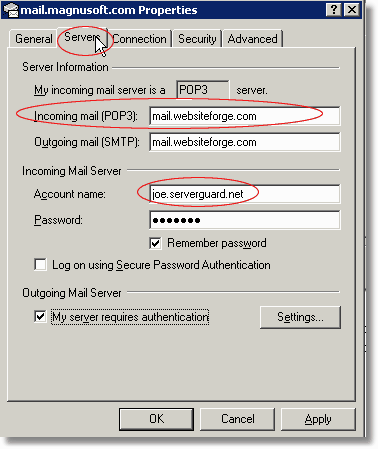
Did you mistype the account name? All account names will end in your domain. So the e-mail address joe@serverguard.net will have an account name of joe.serverguard.net (not simply joe or joe@serverguard.net). Look at the example below.
Did you mistype your Incoming Mail (POP3) settings? Make sure your incoming mail server is set to mail.websiteforge.com -- In MOST cases the Outgoing server will be the same.
Note: Exceptions are users with SBC, Yahoo, Charter and other ISP's that do not support 3rd party SMTP servers (see below)
Contact support if you have followed the above steps and still can not RECEIVE e-mail. If you can receive email and only can not SEND mail continue reading.
You can't SEND e-mail
1. First, verify that you can RECEIVE e-mail above. Always make sure you can RECEIVE e-mail before troubleshooting SENDING issues.
2. Make sure you have My Outgoing Server Requires Authentication setting checked in your Servers tab of Outlook Express.
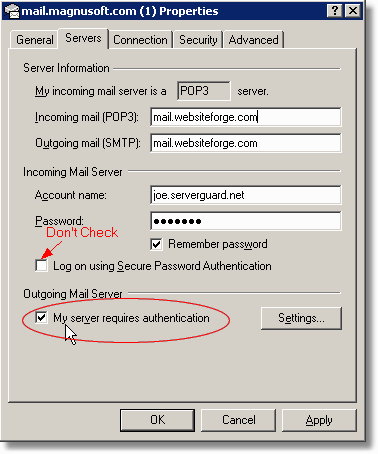
3. Now try to send a test message.
Make sure you clear your OUTBOX of any previous attempts to send messages before re-testing. Previous failed messages in your outbox can give you the impression your email is still not working when, in fact, it is working fine.
If you still cannot send e-mail read the next section to use your ISP's SMTP server
If you still cannot send e-mail you need to contact your ISP
Many ISP's require you to use only their SMTP server to send mail. This means every ISP will have a different way to send e-mail. Below is an example of how SBC would need to be configured.
You will need your SBC login and password to follow this example
1. For example, all SBC customers are forced to change their outgoing settings as follows on the Servers tab:
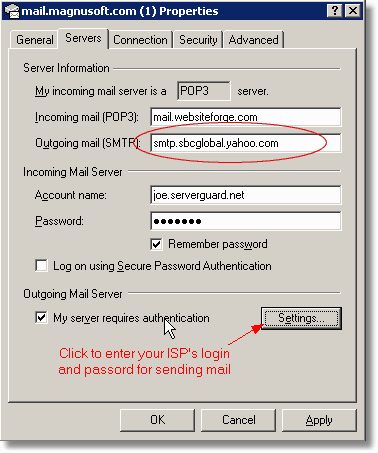
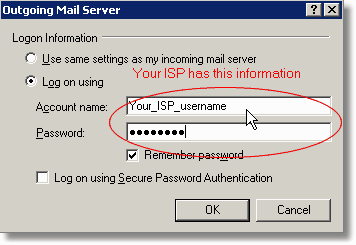
2. Click Settings... and enter your ISP specific login information. EVERY ISP may have a different way to do this.
Settings.. dialog example
SMTP Servers List - Use only if you cannot send email but can receive email
ISP |
SMTP Server |
NetZero.com |
smtp.netzero.com smtp.sbcglobal.yahoo.com |