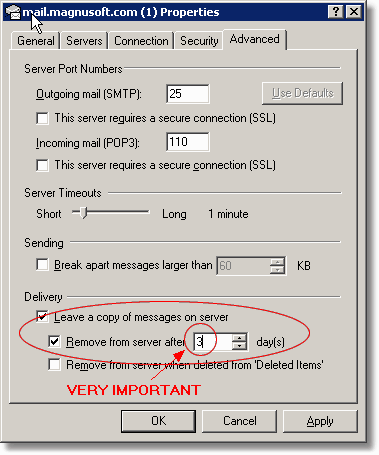
If you would like to receive e-mail from the SAME e-mail address on two different computers you can do this by telling your e-mail program to leave downloaded email on the server.
Explanation:
When you check mail using an email program like Outlook Express your messages are downloaded to your personal computer and then automatically deleted from the Website Forge mail servers. So if you have two computers configured with the same e-mail address then the first computer to download the mail will get the messages. The second computer to check the mailbox will act as-if the messages are not there. If you have your computer setup to check mail every 5 minutes or so -- then it may appear that each computer is intermittently missing messages.
To solve this issue you can use a setting called "Leave Mail On Server" on BOTH computers. This will not delete the messages from the server after they are downloaded so another computer may download them also. There is one inherent problem with using this setting -- eventually your mailbox storage on the server will reach it's limit and start rejecting mail. So make sure you specify how long the mail should be left on the server. We recommend leaving mail on the server for 3 days or less. If you plan to use one computer without checking the other for more time than this you should turn off the other computer completely so it will not try to download your messages.
Example (Outlook Express):