Design Settings control the overall look and color of your site design and navigation
The Design Settings you may control include:
| • | Major Color of your design |
| • | Major Image/Logo of your design |
| • | Company Name Font |
| • | Slogan Font |
| • | Inactive Main Menu Item Font |
| • | Active Main Menu Item Font |
| • | Popup Menu Location |
| • | Popup Menu Width |
| • | Optional Popup Menu Custom Fonts |
| • | Optional Popup Menu Custom Colors |

How do I get to the Design Settings menu?
1. Go to the Site Template and Settings page using the left navigation menu
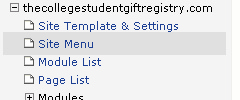
2. Click the Design Settings button

Selecting Fonts:
You can change fonts one of two ways. (1) You can use the drop down menus or (2) you can click the Preview and Pick Font links
