Ever wonder why you can't seem to make your text or images line up exactly?
Web Browsers work in "relative" proportions -- there is no "absolute" position or alignment at a page level.
If every web browser was proportional to an 8 1/2" x 11" piece of paper you could specify the exact position of every word, link and image. However, that is just not the case. First, browsers vary by software manufacturer. Internet Explorer views differently than Firefox, and so on. And more importantly -- today's computer owner can adjust the size and resolution of his or her screen. The point is that 1 inch on one computer may look like 3 inches on another.
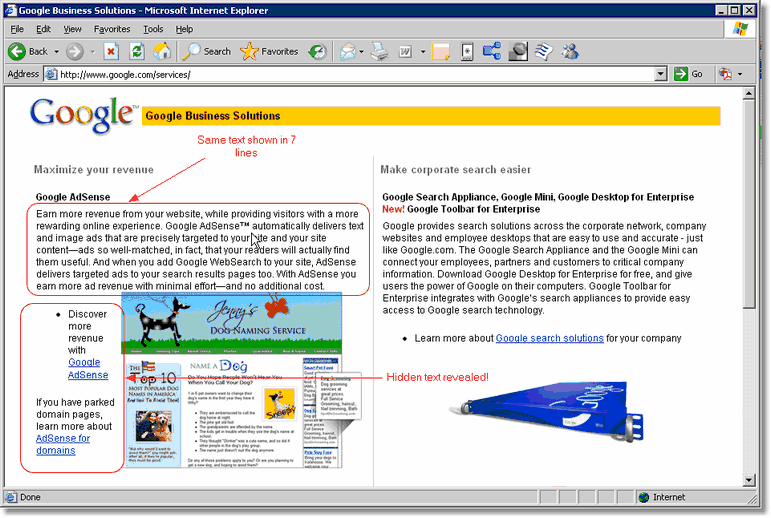
This is the very reason that web pages are generally designed in "relative proportions". Instead of specifying 4 inches you would instead specify 50%. Instead of attempting to line up every sentence in a paragraph, you would simply click the "center" icon in your editor and allow the text to wrap. Some screens may show 10 lines of text and a wider screen may show 7 lines.
Take a look at two screenshots of the very same web page on two computers with different screen sizes.
Screenshot 1 on a small screen - Notice 10 lines of text and the text covered by the image
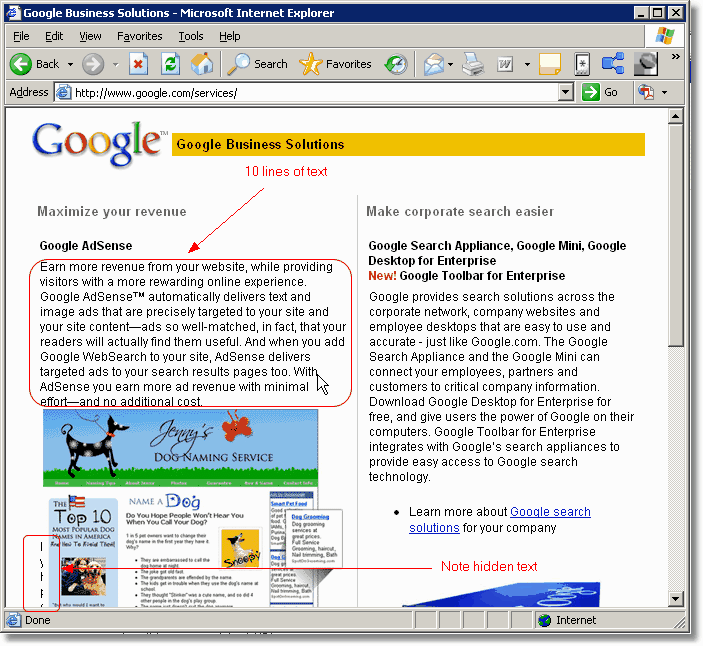
Screenshot 2 on a larger screen - Notice the same paragraph is only 7 lines and the hidden text is now revealed