What type of images can you upload to your web site pages?
Web Friendly Image types - Some image types are designed for web site use. We accept the three most common formats.
| • | JPG (pronounced Jay-peg) |
| • | PNG (pronounced Ping) |
| • | GIF (pronounced just like it's spelled) |
Incompatible Image types - You can easily convert any of these incompatible file types to a JPG, PNG or GIF file using low cost or free software.
| • | PDF - This is not actually considered an image file. It is considered a document. They can not be uploaded as an image |
| • | BMP - Bitmap files are not considered web friendly |
| • | TIF - TIF files are extremely large in size and never a good choice for your web site |
| • | PSD - PSD files are a type of source code that graphic designers use. PSD files can not be used directly on your web site |
Uploading images from your computer
1. From any Rich Text editor place your cursor where you want your image.
2. Click on the  icon. You will then see your Image Store.
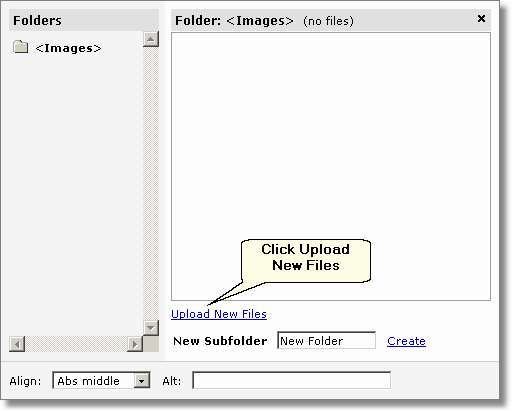
3. Click on Upload New Files and use the Browse.. button to select the image you wish to upload. (you may select up to 5 images at one time)
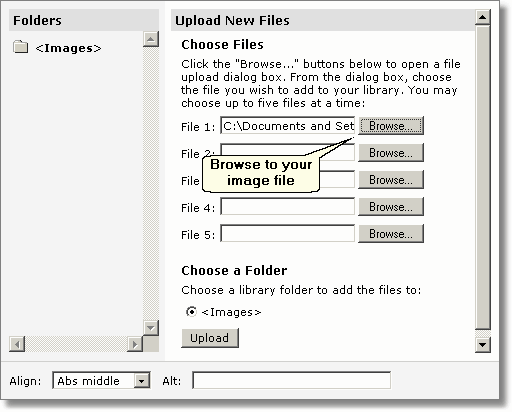
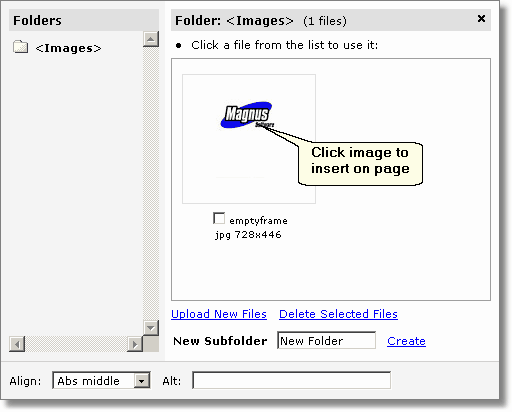
4. Click the  button to move the image up to the Image Store. You should now see a small thumbnail image that looks like the one you uploaded.
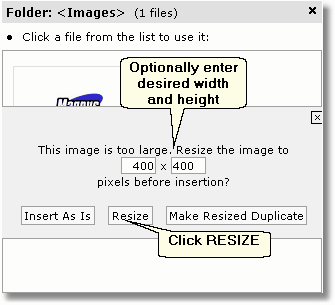
IMPORTANT: If you upload an image larger than 400 pixels, you will be prompted to resize your image. Unless you need the image to stay it's original size, choose the Resize button to resize the image to a more optimum size.
5. The image will now display in your page.

6. Press  to save your changes.